
Applicant Tracking System Checklist: How to Choose the Right ATS (2026)
Every applicant tracking system pricing page reads the same way — dozens of features, all described as essential. Most of them aren't, for a team hiring a handful of roles a year. This checklist strips the list down to what actually matters when you're choosing an ATS for a small hiring team: the features worth insisting on, the ones you can skip, the red flags that mean walk away, and the questions to ask before you sign up.
The Must-Have Features Checklist
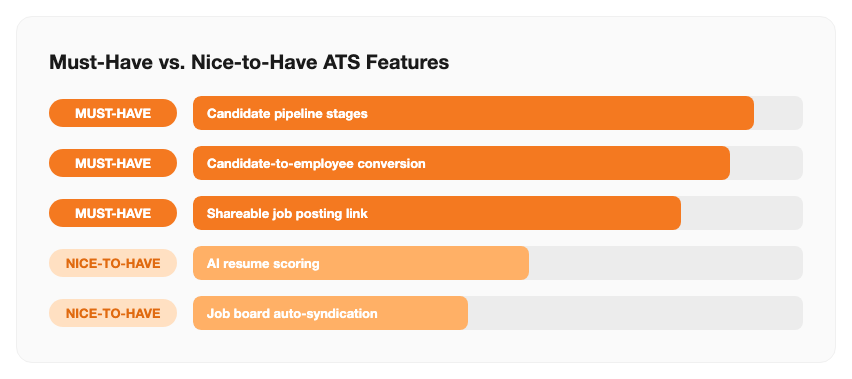
If a tool is missing any of these, it isn't really replacing email-and-spreadsheet hiring — it's just a fancier inbox:
| Feature | Why It Matters | Red Flag If Missing |
|---|---|---|
| Visual pipeline stages | See who's applied, screening, interviewing, or offered at a glance | A flat resume list with no stages isn't a pipeline |
| Candidate-to-employee conversion | Hired candidates become employee records with one click | Re-typing name, contact, and documents into a second system |
| Shareable job posting link | One link works on any job board, careers page, or social post | Manually re-posting the same listing on every board separately |
| Shared interview notes | Feedback stays attached to the candidate, visible to everyone hiring | Notes scattered across individual inboxes and chat threads |
| Flat, headcount-based pricing | Cost doesn't spike just because hiring season gets busy | A fee per open job posting or per recruiter seat |
Past these five, most remaining "features" on a vendor's list are nice-to-haves, not deal-breakers — see the next section.
Nice-to-Have Features You Can Skip (For Now)
These show up on almost every ATS pricing page, and they're genuinely useful at scale — but they rarely change the outcome of a hire for a small team, and are often what pushes a plan into a higher, enterprise-priced tier:
- AI resume scoring — useful when screening hundreds of applicants per role; a small team can read 15-30 resumes by hand faster than it takes to configure a scoring model
- Job board auto-syndication — posting to a dozen boards automatically matters at high volume; most small businesses post to two or three and a shareable link covers that
- Requisition approval workflows — built for companies where a hire needs sign-off from multiple department heads before a job even goes live
- Advanced diversity/DEI analytics dashboards — valuable for compliance reporting at larger headcounts, rarely a factor in a 10-person hiring plan
- Video interviewing built into the ATS — convenient, but a free video call link works just as well until you're running dozens of interviews a week
Red Flags That Mean Walk Away
- No published pricing — "contact sales" on every plan usually means the price is set by how much a salesperson thinks you'll pay
- Per-job-posting fees — this penalizes exactly the busy hiring months an ATS is supposed to help with
- No data export — if you can't take your candidate history with you, switching tools later means starting from zero
- No free trial or free tier — you can't judge whether a pipeline actually fits how your team hires without running a real open role through it
- Setup or implementation fees — a tool built for small teams shouldn't need a paid onboarding project to get running
Questions to Ask Before You Buy
Save these for the sales call or the FAQ page — the answers usually reveal more than the feature list does:
- "Does the price change if I have three roles open at once instead of one?"
- "When I hire someone, does their profile carry over into an employee record, or do I re-enter everything?"
- "Can I export all my candidate data if I decide to switch tools later?"
- "Does the free trial or free tier include the actual pipeline, or just job posting?"
- "Is there a setup fee, or can I be live the same day I sign up?"
Standalone ATS vs. Built Into Your HR Platform
The must-have checklist above applies either way — but where the tool lives changes how much friction you deal with after someone accepts an offer:
| Standalone ATS | ATS Built Into HR Platform | |
|---|---|---|
| After a hire is made | Export candidate details, re-enter into HR/payroll system | One click converts candidate to employee record |
| Pricing | Separate subscription, often per seat or per posting | Included in your existing HR plan |
| Onboarding handoff | Manual, via export/import or a paid integration | Automatic — same employee record throughout |
| Best fit | Hiring is your only software need right now | You also need leave, attendance, or payroll |
How SnapHRM Checks These Boxes
SnapHRM's applicant tracking system covers the must-have list directly: a visual pipeline by stage, one-click candidate-to-employee conversion into the same employee record used for payroll and leave, one shareable link per job opening, and shared interview notes visible to everyone on the hiring team. Pricing is flat per employee headcount — not per job posting or per recruiter seat — and it's included free for up to 5 employees, with no separate ATS invoice to justify.
Try a Built-In ATS on Your Next Open Role
SnapHRM includes a full applicant tracking system in every plan, with a self-hosted Pro option for teams that prefer a one-time payment. Free for up to 5 employees.
Try SnapHRM FreeRelated Articles
Salary Slip Format in India: Components, Free Template & How to Generate Payslips Payroll · 8 min read Leave Policy in India 2026: Types of Leave, Rules & Free Policy Template Compliance · 10 min read Offer Letter Format in India: Free Templates & Complete Guide (2026) Recruitment · 7 min read Employee Onboarding Checklist for Indian Companies: Step-by-Step Guide (2026) HR Management · 9 min read Employee Self-Service Portal: Benefits, Cost & ROI for Small Businesses (2026) HR Management · 9 min read Applicant Tracking System (ATS): Cost, Benefits & ROI for Small Businesses (2026) Recruitment · 8 min read Biometric vs Software-Based Attendance Tracking: Which Is Better for Small Business? (2026) HR Management · 8 min read Expense Management Software: Cost & ROI for Small Businesses (2026) HR Management · 8 min read HR Analytics Software: Cost & ROI for Small Businesses (2026) HR Management · 8 min read HR Analytics Software vs. Excel: Cost, Speed & Accuracy (2026) HR Management · 8 min read Asset Management Software: Cost & ROI for Small Businesses (2026) HR Management · 8 min read Asset Management Software vs. Spreadsheets (2026) HR Management · 8 min read Leave Management Software: Cost & ROI for Small Businesses (2026) HR Management · 8 min read Document Management Platforms: Cost & ROI for Small Business (2026) HR Management · 8 min read Best Payroll Software in India 2026: Top 8 Tools Compared Payroll · 15 min read Mandatory HR Policies in India 2026 With Latest Amendments Compliance · 12 min read Best HR Software for US Businesses in 2026: Top 8 Compared HR Software · 12 min read US Labor Law Compliance Guide for Small Businesses (2026) Compliance · 15 min read Best HR Software for Singapore Businesses in 2026: Top 8 Compared HR Software · 12 min read Singapore Employment Act Guide for SMBs: Complete Overview (2026) Compliance · 14 min read Attendance Management Software: Cost & ROI for Small Businesses (2026) HR Management · 8 min read Employee Onboarding Software: Cost & ROI for Small Businesses (2026) HR Management · 8 min read Relieving Letter Format India: Free Templates & Guide (2026) HR Management · 7 min read Appointment Letter Format India: Free Template & Sample (2026) Recruitment · 8 min read Experience Letter Format India: Free Template & Sample (2026) HR Management · 7 min read Salary Certificate Format India: Free Template & Sample (2026) Payroll · 7 min read Confirmation Letter Format India: Free Template & Sample (2026) HR Management · 7 min read Expense Management Software vs. Spreadsheets (2026) HR Management · 8 min read Termination Letter Format India: Free Template & Notice Rules (2026) HR Management · 8 min read Payroll Software vs Excel: Cost, Compliance & Errors (2026) Payroll · 8 min read Leave Management Software vs. Spreadsheets (2026) HR Management · 8 min read Expense Management Software Checklist: How to Choose (2026) HR Management · 8 min read Attendance Management Software Checklist: How to Choose (2026) HR Management · 8 min read Applicant Tracking System vs. Spreadsheets (2026) HR Management · 8 min readFree HR Tools
Frequently Asked Questions
What features should a small business look for in an ATS?
What are red flags when evaluating an ATS?
How many features does a small business actually need in an ATS?
Should I choose a standalone ATS or one built into my HR software?
Is a free ATS good enough for a small business?
What questions should I ask an ATS vendor before signing up?
Hire With a Checklist-Ready ATS
Pipeline, notes, and one-click hire-to-employee conversion — all included. Free for teams up to 5 employees.